

1. You’re Not Just on the Map – You’re in the Moment
When someone searches for a product or service “near me,” Google prioritizes businesses with complete and accurate location information. This means your business address, pin placement, service area, and other location details directly influence whether or not you show up in local search results and on Google Maps.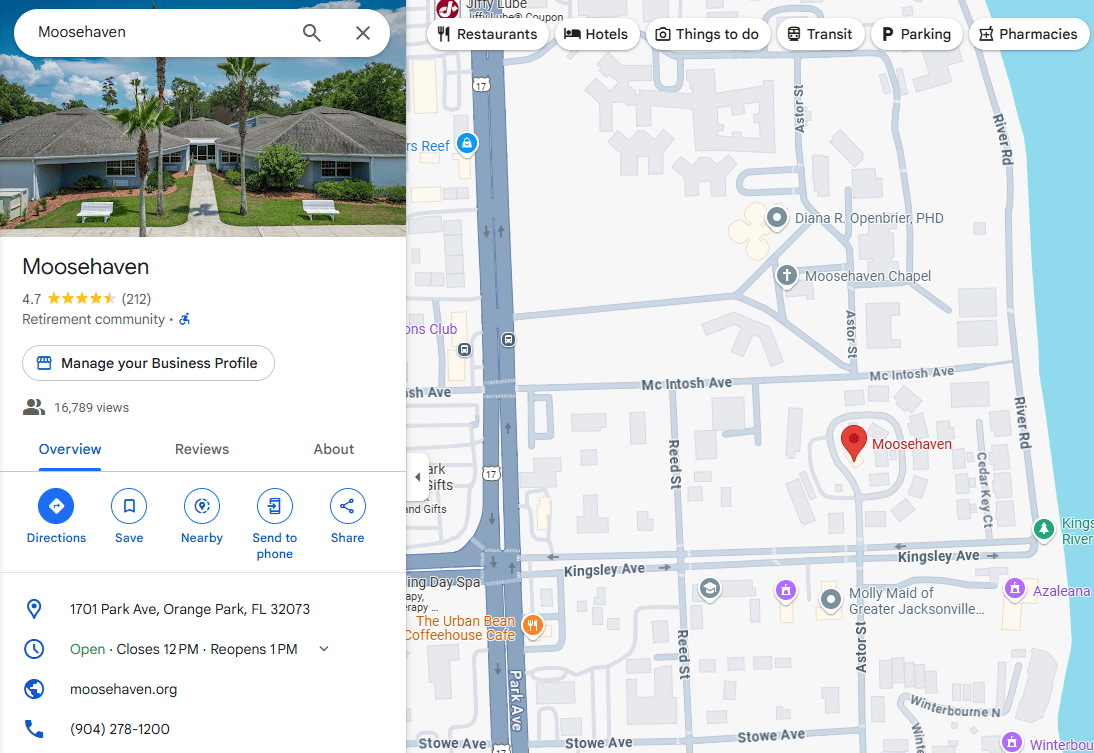
Here’s an example of one of our clients, Moosehaven – a well-established retirement community located in Orange Park, FL. For a community like Moosehaven, having a strong presence on Google Maps is essential. It helps prospective residents and their families easily find them, explore the campus, and get directions. Visibility on Google Maps also supports their credibility and enhances local search performance.
Why It’s Important:
- Captures Local Customers: People searching in your area are often ready to make a purchase. Showing up in their local search puts you right in front of them when it matters most.
- Builds Immediate Trust: A complete profile with a clear location, directions, and photos of your storefront gives potential customers confidence that you’re a legitimate, accessible business.
- Increases Foot Traffic: Accurate location info helps people find your physical store quickly and easily – whether they’re walking, driving, or using rideshare services.
How to Use It:
- Pinpoint Your Address Correctly: Double-check that your business is mapped accurately. A misplaced pin can cause confusion – and lost customers.
- Add a Service Area (if applicable): If you offer delivery, at-home services, or mobile appointments, you can list the areas you serve without needing to show a physical storefront.
Include Entry Details: If your store is inside a larger building or in a plaza, provide additional details (e.g., “Next to the post office” or “Suite 204, upstairs”).
2. Use Visual Cues to Guide and Impress
Google Maps listings that include high-quality visuals – like photos of your storefront, interior, parking lot, or signage – help customers visually confirm they’ve found the right place before they even arrive.
Why It’s Important:
- Reduces Friction: Customers are more likely to visit if they know what to expect when they get there. Visuals can answer questions like, “Is there parking?” or “What does the front entrance look like?”
- Increases Conversions: Businesses with robust photo galleries on Google see more direction requests, clicks, and phone calls.
How to Use It:
- Upload Exterior Photos: Make sure customers know what your building looks like from the street.
- Showcase Your Space: Interior photos help create familiarity and comfort, especially for restaurants, salons, or professional services.
Keep Photos Updated: If you’ve recently renovated, changed signage, or added new outdoor features, update your visuals accordingly.
3. Take Advantage of “Directions” and “Popular Times” Features
Google aggregates data from your business activity (and even customer foot traffic) to provide helpful insights like “Popular Times”, average visit duration, and real – time busyness updates. These features are based on your location – and they’re incredibly valuable to customers making quick decisions.
Why It’s Important:
- Improves Planning for Customers: People appreciate knowing when your store is less busy or how long a visit might take.
- Enhances User Experience: Features like “Get Directions” or “Call Now” right from the map make it easier for customers to act on their decision without having to visit your website first.
How to Use It:
- Ensure Your Hours Are Accurate: This includes special holiday hours. Mismatched hours can lead to missed business.
- Monitor Insights: Google provides metrics on how people find and interact with your location. Use this data to understand what’s working – and what needs improvement.
Optimize for Mobile Searchers: Many people will discover your business while on the go, especially via Google Maps. Make sure your mobile experience (including website) is fast and functional.
4. Get into the “Local 3 – Pack”
One of the most coveted spots in local search is the Google Maps 3 – Pack – the top three local listings shown in search results. Appearing here can drastically increase your visibility and drive more clicks, calls, and visits.
Why It’s Important:
- Massive Exposure: The 3 – Pack shows up above organic search results on both desktop and mobile.
- High Click – Through Rates: These listings include your rating, hours, address, and more – all of which influence a potential customer’s decision.
How to Use It:
- Encourage Positive Reviews: Businesses with strong star ratings and active reviews tend to show up more frequently.
- Fully Complete Your Profile: Google favors profiles that are 100% complete with categories, services, photos, and updated info.
- Stay Active: Posting updates, answering questions, and adding new photos tells Google that your business is engaged and trustworthy.
Final Thoughts
Optimizing your location on Google Business Profile is one of the most impactful – and often overlooked – ways to boost your local visibility. When done right, it transforms your profile from a basic listing into a local magnet for foot traffic, phone calls, and customer trust.
Remember, it’s not just about being found – it’s about being chosen. And when customers can clearly see who you are, where you are, and what you offer, they’re far more likely to walk through your door.
Want to see real – world examples of how location can elevate your profile? Watch our companion video on “Using Google Maps to Drive Foot Traffic for Small Businesses” on our YouTube channel.
For more information, watch our YouTube video on Using Google Business Profile to Grow Your Business.